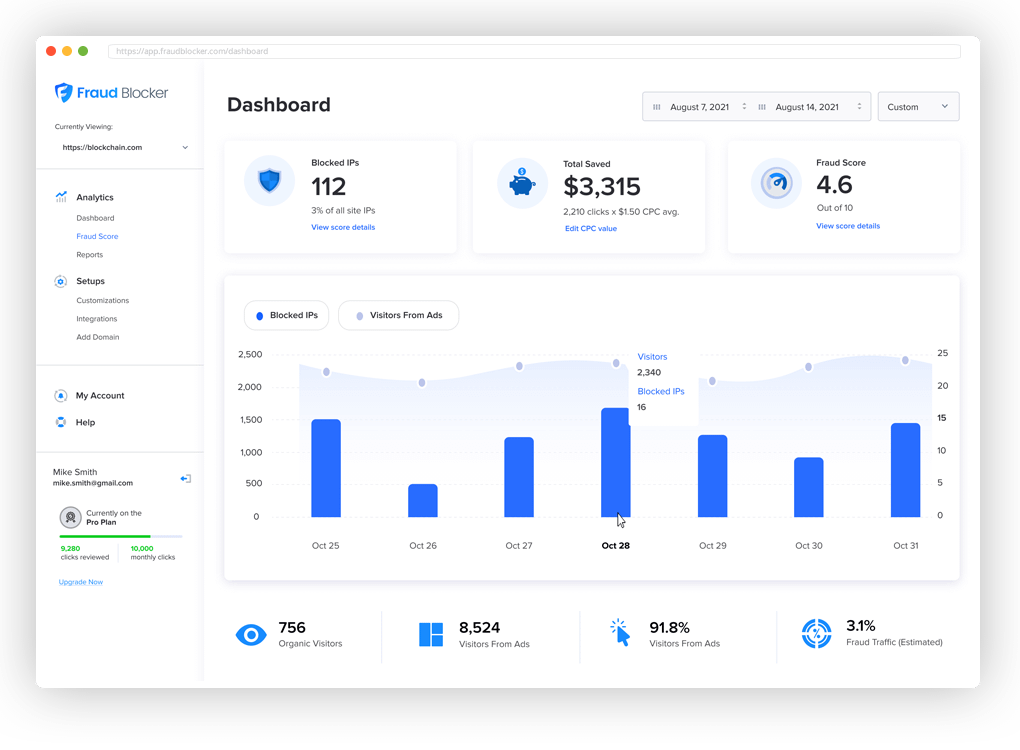
An estimated $100 billion will be lost to ad fraud in 2023. That’s nearly 20 percent of all digital ad spend. Fraud Blocker solves this issue for marketers with advanced software that automatically blocks traffic from bots and other malicious sources.
Our industry-leading service is able to detect fraudulent ad clicks to your website and then block them from displaying in near real-time. Reach more qualified users and generate more leads with our proprietary platform.
In one week Fraud Blocker saved me $200 on $4,000 spent on Google Ads. I manage Google Ads campaigns in France? It’s a good start and my client is very happy with the results because he suspected many fraudulent clicks and it turned out to be correct. I really recommend this app.
Abder-KINANE AppSumo Member
Incredible software that I love on day one
I am incredibly pleased with my purchase. If you work in paid media, this is a great piece of software at an incredible price. If you need someone to test features, let me know. Thanks again! Great software!
jnathangarrett AppSumo Member
Very powerful and effective
“The app is very powerful and effective. It has a lot of options which are really helpful. It’s also customizable.”
Pallavi R. Engineer
Pays for itself and stellar customer service
Saves tons of money by stopping garbage and fraudulent ad clicks. And when I needed some help understanding my dashboard, I called and got great 1-on-1 help.
Josh S.
Business owner
Very clean with tons of potential
I was able to very quickly set up my Google Ads account and connect it right away. I input the average CPC and away we went. While the traffic is low on my current campaign, the data being pulled in once I put the pixel on the website appears to be accurate.
CWD1979 AppSumo Member
Great product!
Okay I just jumped onto an unlimited plan. All went smoothly and I was able to roll over all of my accounts from a Google Ads MCC account. If you’re authorizing through an MCC account the process is smooth and segregated with a clear separation between all of the sub accounts. Everything is great so far.
I manage Google Ads campaigns in France. It’s a good start and my client is very happy with the results because he suspected many fraudulent clicks and it turned out to be correct. I really recommend this app.
Abder-KINANE AppSumo Member
Very powerful & effective
“The app is very powerful and effective. It has a lot of options which are really helpful. It’s also customizable.”
Pallavi R. Engineer
Incredible software that I love on day one
I am incredibly pleased with my purchase. If you work in paid media, this is a great piece of software at an incredible price. If you need someone to test features, let me know. Thanks again! Great software!
jnathangarrett
AppSumo Member
Works With Any Website
Easily install Fraud Blocker on virtually any website in less than 5 minutes.